Skip to content

From montage to printable fNIRS cap

One desktop application in which an fNIRS or hybrid EEG–fNIRS montage is designed or imported, turned into a printable cap for a given head, and exported as STL panels and Aurora-ready probe files, as one folder that says how it was made.

Version 0.0.6, a tester build for Linux and Windows. The companion to NIRWizard, for the cap the optodes sit in.

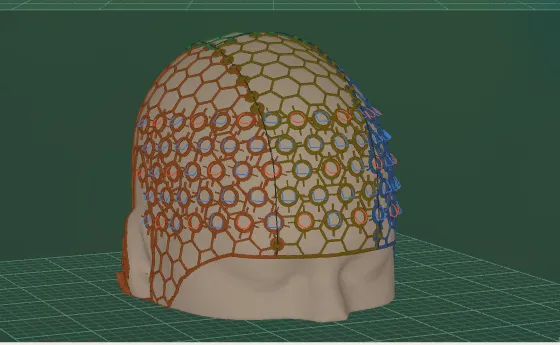
A generated cap draped on the design head: an open hexagonal lattice in a colour per panel, with a ring holder at every optode

Six stages on one rail

Each stage says what it holds. Change one and every stage after it is marked stale, so the panels you print always match the montage you see.

  1. 1

    Montage

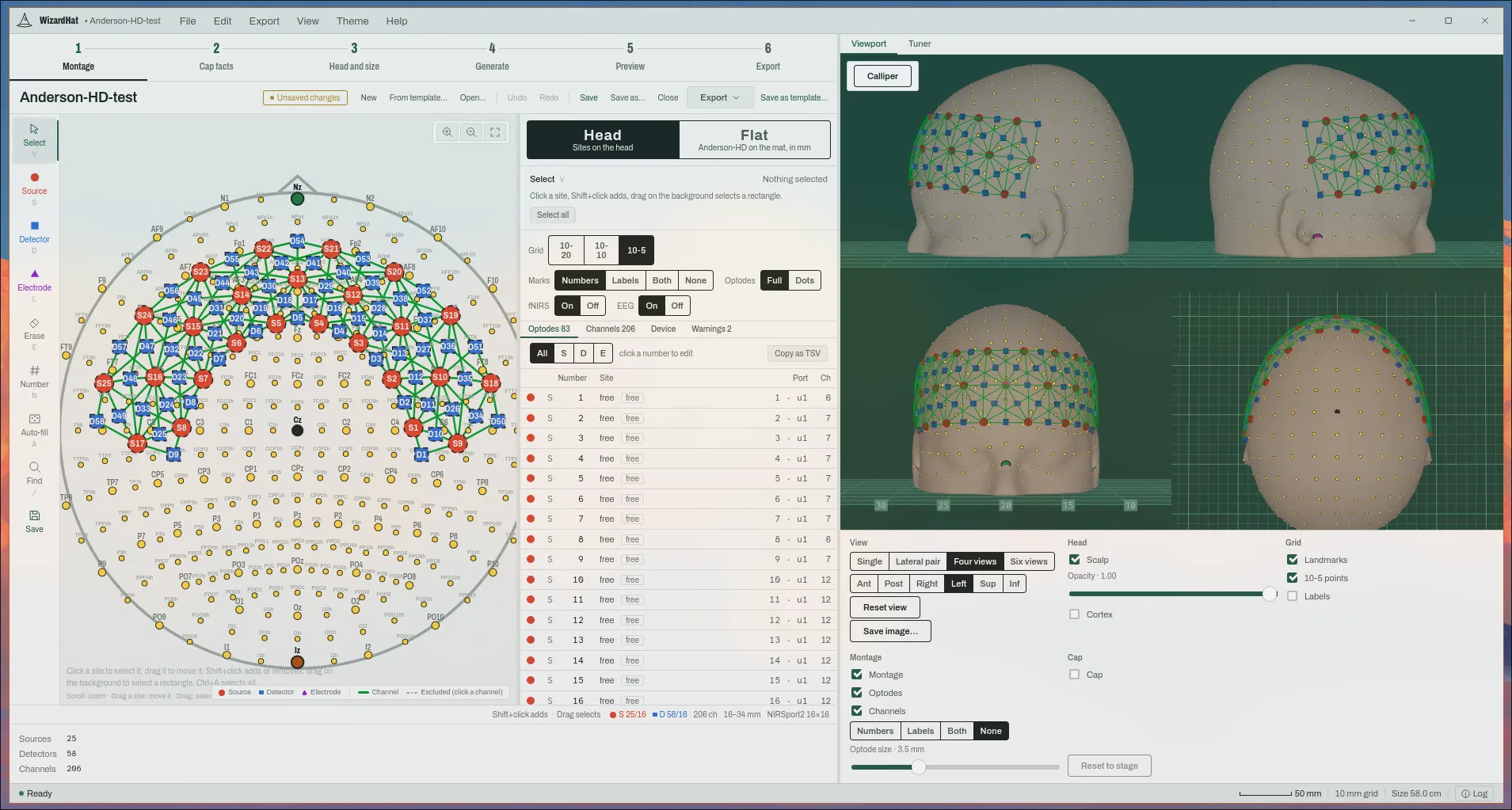
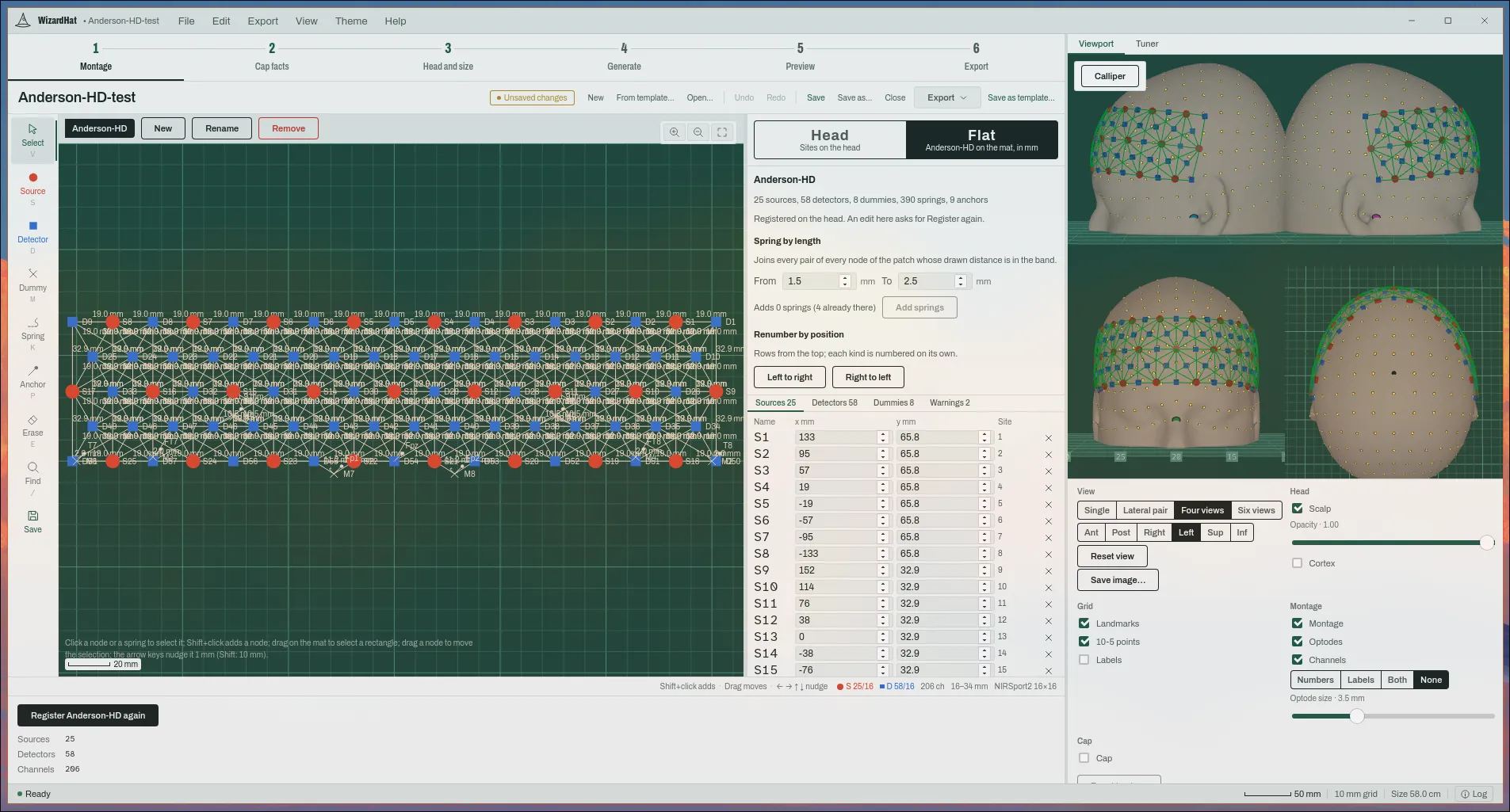
    Sources and detectors on the 10-5 reference points or placed free anywhere on the scalp, in a top view with the same montage on the 3D head beside it. The channels follow.

    The Montage stage: a high-density montage of 25 sources and 58 detectors in a top view, its optode table, and the montage on a 3D head
  2. 2

    Cap facts

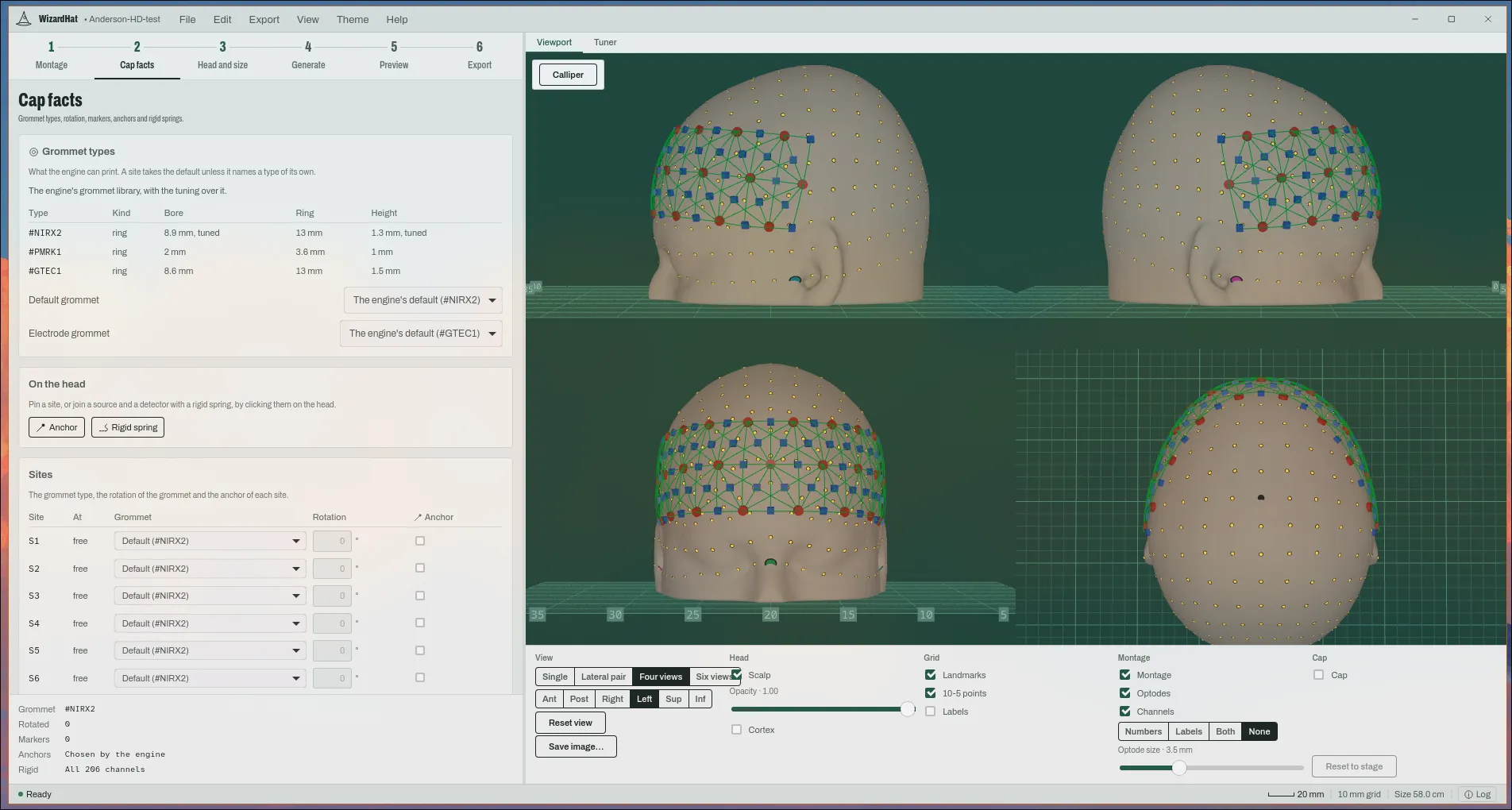
    The grommet type and rotation of each site, markers, anchors and rigid springs. They are saved with the montage, not in a sidecar.

    The Cap facts stage: the engine’s grommet library and a grommet type, rotation and anchor for each site
  3. 3

    Head and size

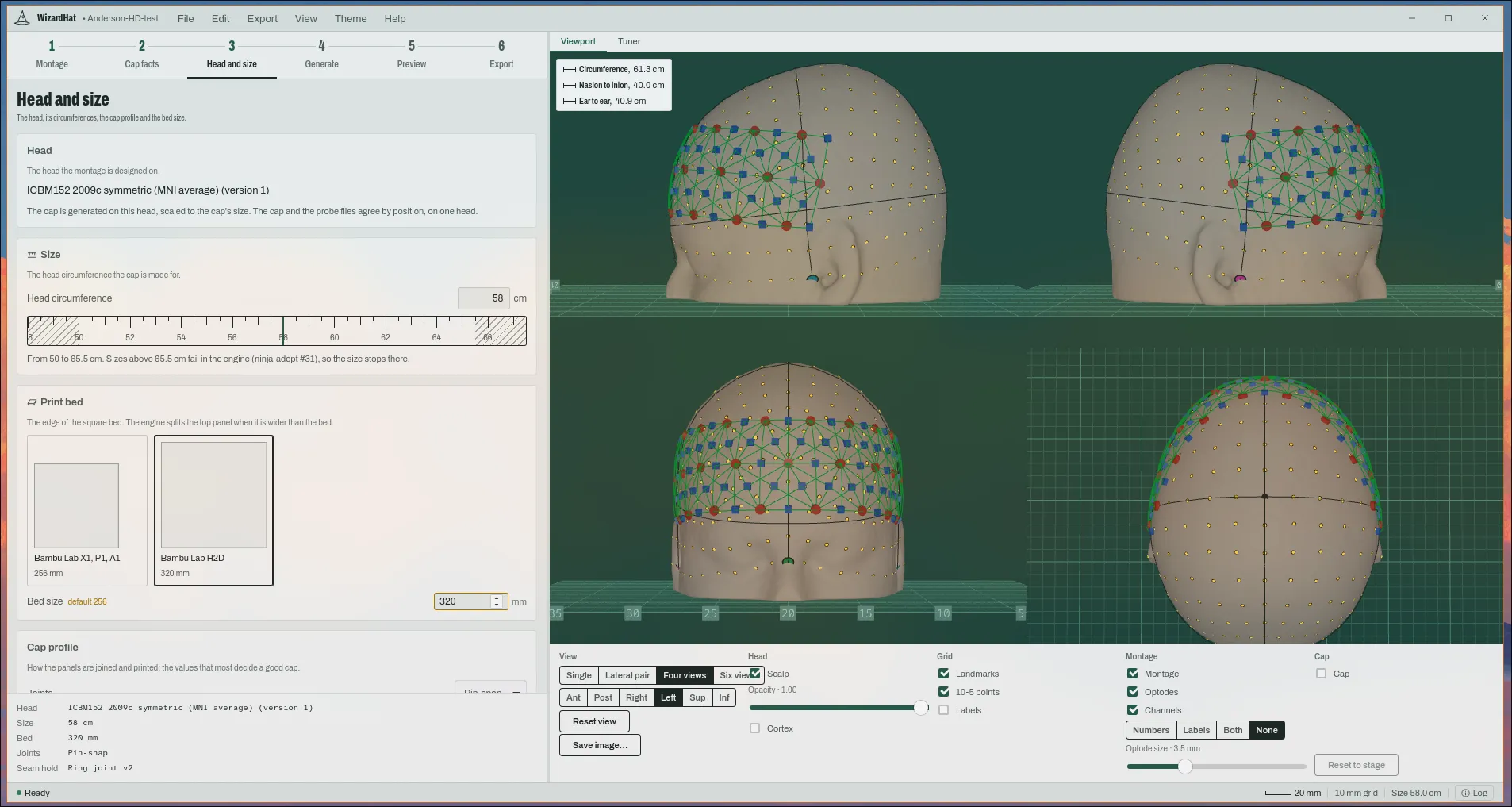
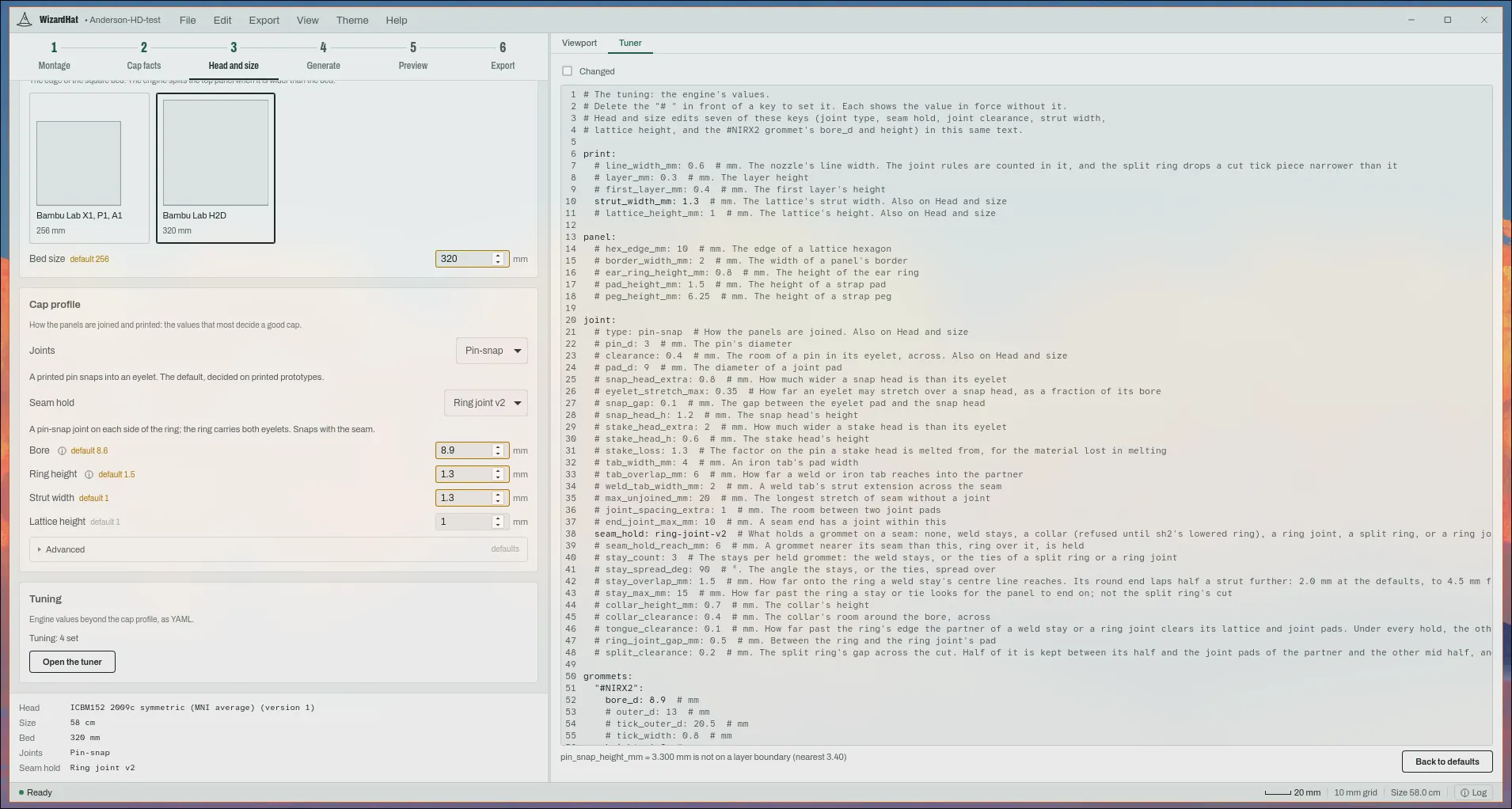
    The head circumference from 50 to 65.5 cm, the print bed and the cap profile: joints, seam hold, bore, ring height and strut width.

    The Head and size stage: the design head, a 58 cm circumference, a 320 mm bed and the cap profile
  4. 4

    Generate

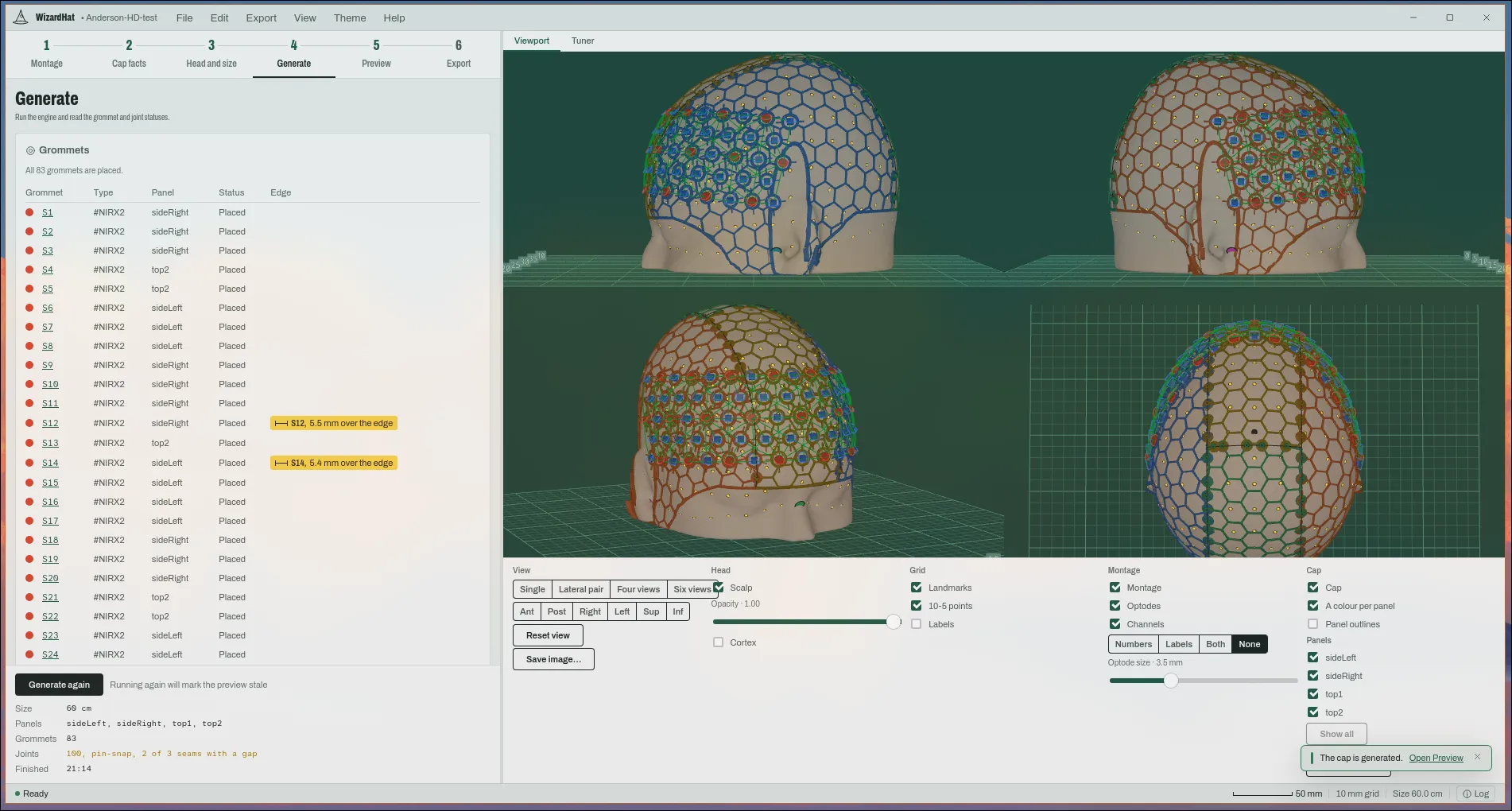
    The engine runs inside the app and draws the cap on the head as it goes. Every grommet and every joint gets a status.

    The Generate stage: a finished run, all 83 grommets placed, and the cap drawn on the head in a colour per panel
  5. 5

    Preview

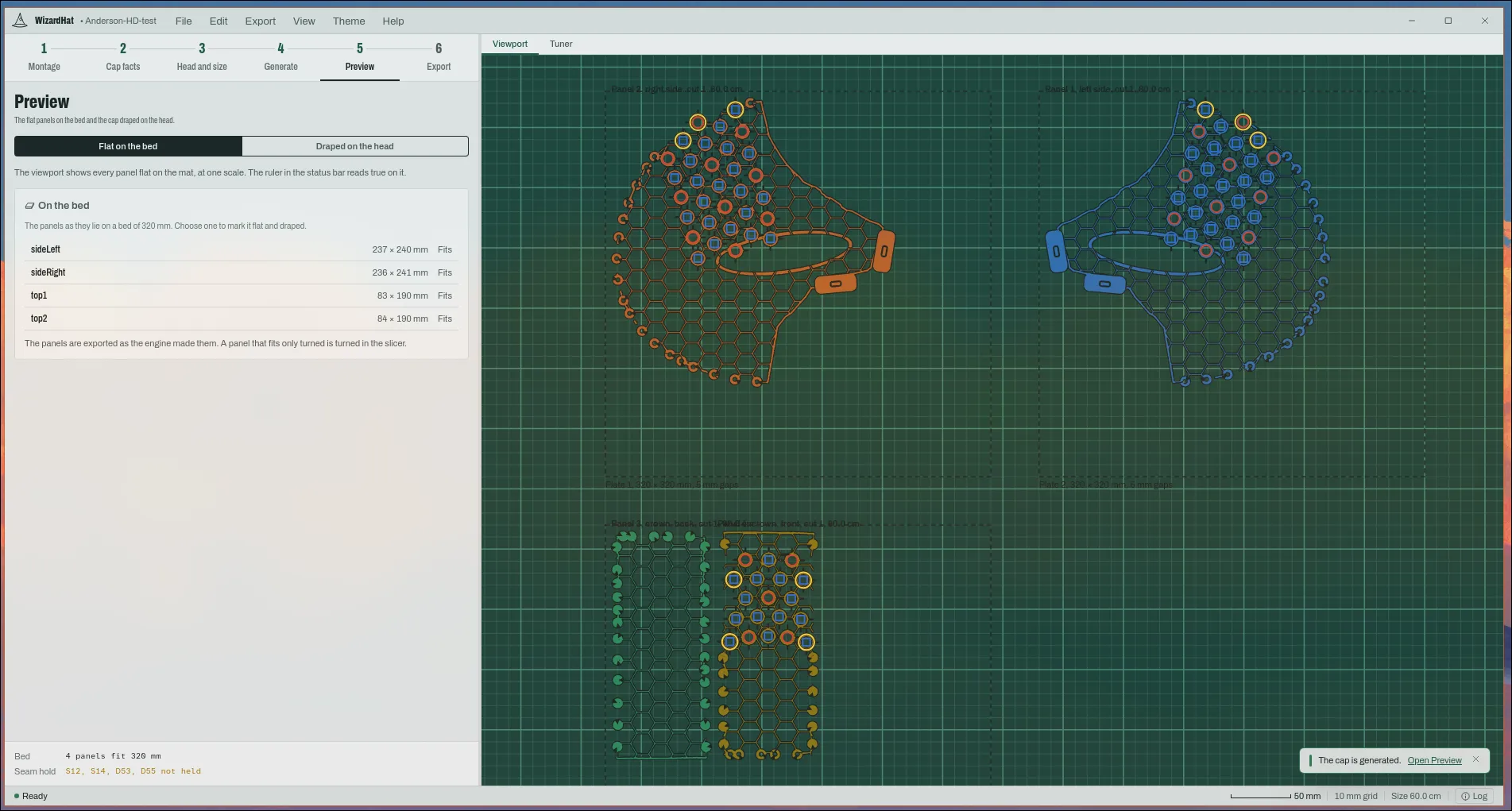
    The flat panels on the print bed at one scale, and the cap draped on the head. See what will print before it prints.

    The Preview stage: four flat cap panels laid out on two 320 mm print beds
  6. 6

    Export

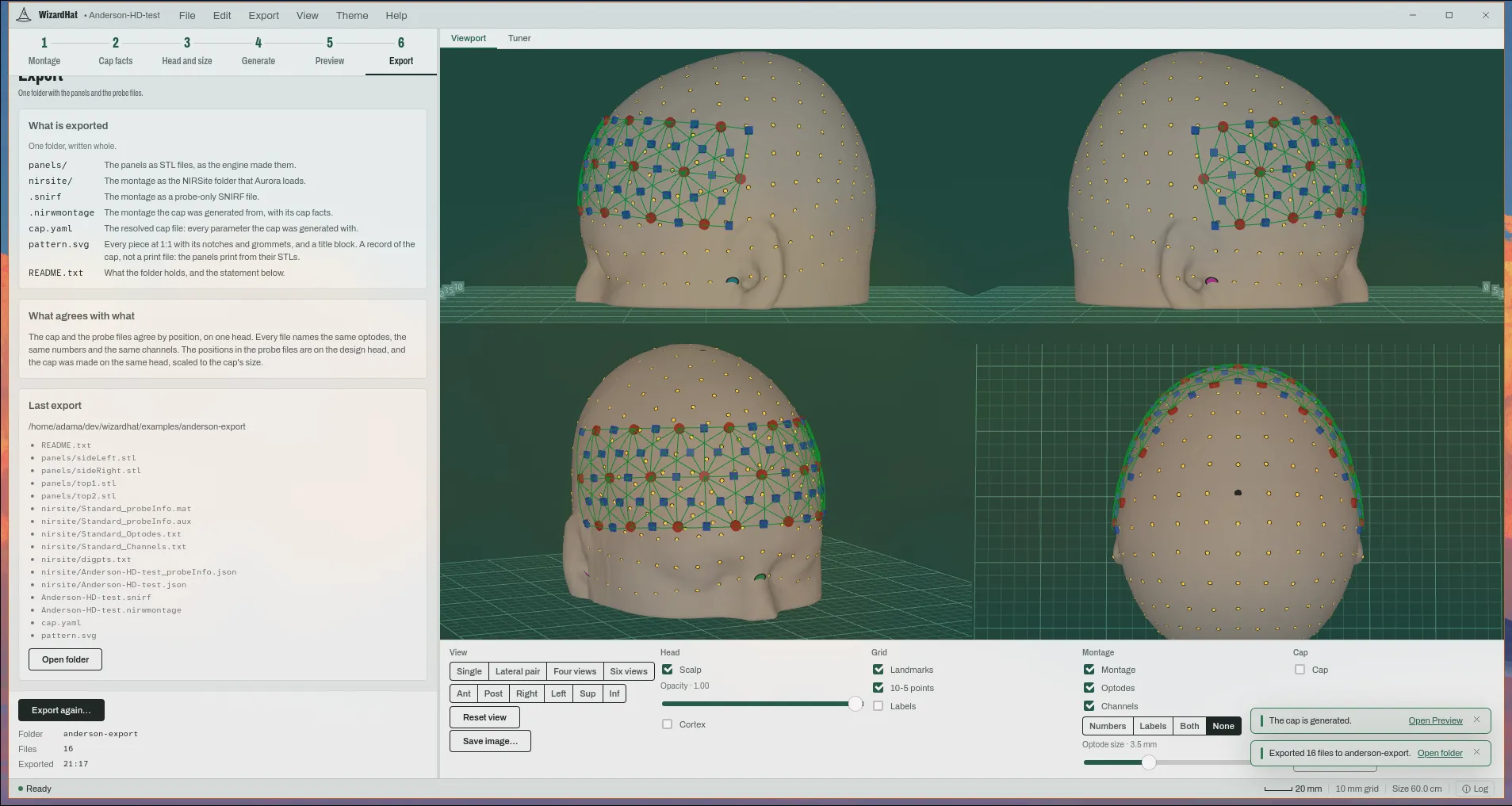
    One folder: the panels as STL, the probe files Aurora loads, the electrode positions of a hybrid cap, and a record of how the cap was made.

    The Export stage: the folder just written, its 16 files listed

Three more rooms

On the Montage stage, a flat editor and a third role. On Head and size, every value of the engine.

  • Flat on the mat

    A patch designed in millimetres from nodes, springs, anchors and dummies, the way AtlasViewer’s SDgui works, and registered onto the scalp. An AtlasViewer .SD opens as one.

    Flat mode: a patch of nodes and springs on the cutting mat, its source table, and the registered montage on the head
  • EEG electrodes

    A third role beside the optodes, for a hybrid cap. An electrode gets a ring holder and goes through the engine like an optode. The export writes BIDS electrodes.tsv beside the fNIRS files.

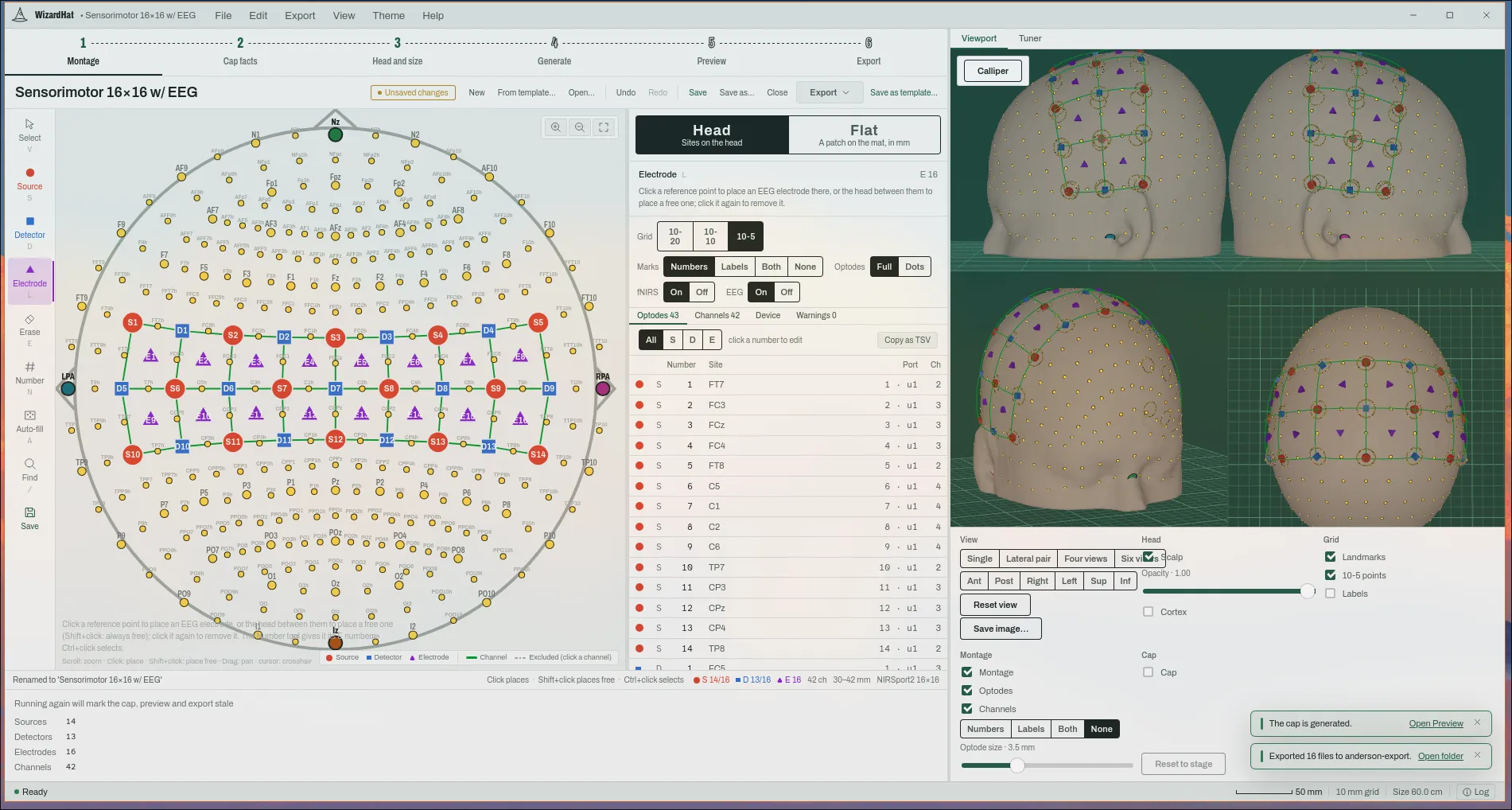
    A sensorimotor montage with 16 EEG electrodes between its optodes, in the top view and on the head
  • The Tuner

    Every physical value of the engine is a key of one YAML text, with the default beside it and errors on their line. Head and size edits seven of those keys; the Tuner reaches the rest.

    The Tuner tab: the engine’s values as YAML, each with its default and a comment

The figure, for the paper

The montage exported as a figure, as SVG or PNG, with a transparent variant. Numbered by optode or by channel, with the legend counted.

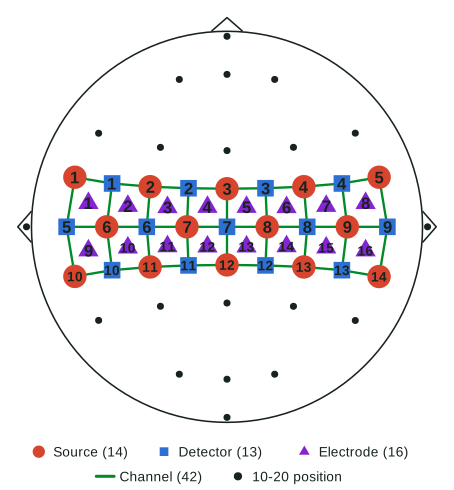
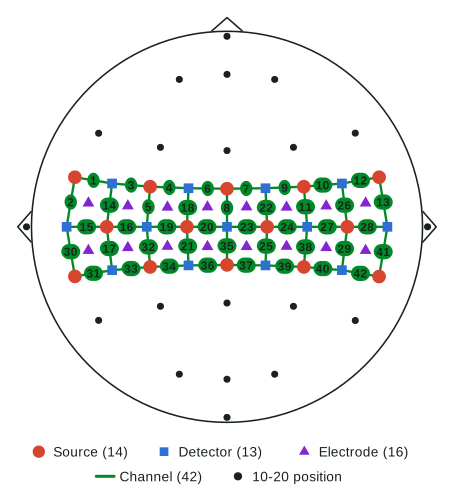
  • Montage figure: 14 sources, 13 detectors and 16 electrodes on a head outline, each with its number, and a legend

    Sensorimotor 16 × 16 with 16 EEG electrodes, numbered by optode.

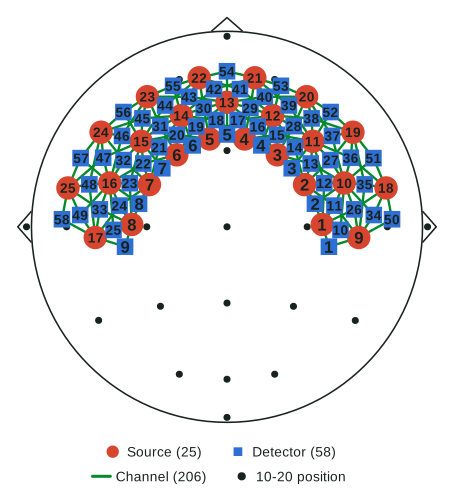
  • Montage figure: the Anderson-HD high-density montage over the frontal half of a head outline, every optode numbered

    Anderson-HD: 25 sources, 58 detectors, 206 channels.

  • Montage figure: the sensorimotor hybrid montage with its 42 channels numbered on the channel lines

    The same hybrid montage, numbered by channel.

It opens every montage source NIRWizard's Montage Creator reads: .nirwmontage , templates , SNIRF , AtlasViewer .SD . The Montage Creator is NIRWizard's own, brought across with its tests.

The showcase

The slides I use to present WizardHat: why a printed cap, the six stages with one high-density montage, and its export opened file by file. About 15 minutes.

Open full screen

Click the slides, then use the arrow keys. Shows WizardHat 0.0.6.

The 10-minute version

A cap printed for the montage

The cap is flattened into panels, printed, and joined into a lattice with a holder at every optode. It is the ninjaCap method of von Lühmann et al. (Neurophotonics, 2024), made by AdeptCap: my independent reimplementation, with snap-together panels and local generation.

A textile cap

  • Holds a montage only where the grommets are sewn in
  • Needs a custom solution for high density or for EEG
  • Gets hot in a long session, worse with a lot of hair

A printed cap

  • Takes any montage: a holder is printed wherever the montage puts an optode
  • Is an open lattice, so air reaches the head
  • Is flattened into panels that fit the bed of a desktop printer
  • Takes EEG electrodes in the same print, for a hybrid cap
0.59 mm Median grommet offset
From Boston University’s own ninjaCap caps, across two montages, three sizes and 18 panels. Less than one 0.6 mm line width.
Pin-snap Joints without a welder
A 3 mm printed pin on one panel snaps into an eyelet on the next. It prints flat with no supports, at 0.4 mm clearance by default.
In-process Generated on your machine
No cloud service and nothing to install beside the app: the engine is a Rust crate inside it, and the design head ships with it. The first cap of a head size takes about half a minute, the next ones a few seconds.

One folder that says how it was made

The cap and the probe files are written together, on one head, and they name the same optodes, numbers and channels. A different head size changes the panels and nothing else.

<folder>/

  • panels/ the four panels as STL
  • nirsite/ the probe folder Aurora loads
  • eeg/ electrodes.tsv and coordsystem.json, when the montage has an electrode
  • <name>.snirf the probe, no data
  • <name>.nirwmontage the montage, with its cap facts
  • cap.yaml every parameter the cap was made with
  • pattern.svg every piece at 1:1, a record of the cap
  • README.txt what agrees with what, in words

Every parameter, written out

cap.yaml holds values, not a reference to a profile, and says who set each one: the engine’s default, the cap profile, or your choice in the app. If a default changes next year, the file still says what this cap was made with.

Its inputs, by content

The cap names the montage and the design head it was made from by their SHA-256 hashes, and the engine by name and version. Anyone can check them with sha256sum, without WizardHat.

One head

The montage is designed on the design head, the ICBM 2009c symmetric average, and the cap is generated on the same head, scaled to the cap’s size. A grommet lies where its optode lies in the probe files.

One study, two tools

Before the recording: the montage and the cap.

After it: preprocessing, analysis and visualization.

What's in NIRWizard

Download

Version 0.0.6 is a tester build, free to use. Everything runs on your machine: an installer carries the cap engine and the design head.

Printed a cap with it, or hit a problem? Write to me.

Checksums, older versions and release notes are on the release archive.